A business network upgrade reduces costs in three key ways: it eliminates expensive repair labor on failing hardware, lowers ongoing IT support costs through easier management, and recovers lost productivity caused by slow or unreliable network performance. For a 20-person team, even 15 minutes of daily network slowness can cost over $52,000 per year.
If your business is running on network equipment that is more than three to five years old, you are almost certainly paying more than you realize. Not in one obvious line item — but in the slow accumulation of repair bills, lost employee hours, and IT support tickets that never fully resolve.
At Ferrara IT, we have these conversations every week. A business owner calls because their network is sluggish. Our technicians investigate and find hardware that should have been replaced years ago. In many of those cases, the honest recommendation is not a repair — it is a complete network upgrade.
That recommendation surprises people. Most assume an upgrade means a massive capital expense. The reality is different: a strategic business network upgrade often delivers an immediate return on investment — and costs far less than the ongoing drain of keeping aging infrastructure alive.
Here is exactly how it works, and how to determine whether an upgrade is the right move for your organization. If you are also evaluating your broader IT environment, our guide on choosing the right managed IT services partner is a useful starting point.
The first assumption most business owners make is that patching the existing network is cheaper than replacing it. In practice, the math rarely works out that way.
Diagnosing a slow or unstable network is not a simple task. A qualified technician must evaluate the entire environment — routers, switches, wireless access points, cabling, firmware, and configuration — to isolate the root cause. That process takes time, and time is billed labor.
In straightforward cases, the issue is a misconfiguration that can be fixed in a few hours. But when aging hardware is the underlying cause — failing capacitors, degraded firmware, hardware drawing near end-of-life — diagnosis becomes a frustrating process of elimination. Technicians chase intermittent problems that disappear during testing and reappear the moment they leave the office.
The result: labor costs that can easily match or exceed the price of simply installing a modern network from the start. As the saying goes, why invest good money after bad when that same investment could fund a new system with a manufacturer warranty, updated security firmware, and predictable performance?
A business network upgrade can cost as little as $1,500 for a small office and typically ranges up to $15,000 or more depending on office size, number of users, security requirements, and existing infrastructure. The investment often pays for itself quickly through reduced repair labor and recovered employee productivity.
One of the clearest financial benefits of a network upgrade is what happens to your IT support costs afterward. Modern infrastructure is simply easier — and cheaper — to manage.
Newer network equipment offers built-in monitoring dashboards, automated alerts, and centralized management consoles. When something does go wrong, your IT team (or your managed IT services provider) can identify the exact issue in minutes rather than hours. Intermittent connectivity problems — one of the most time-consuming categories of support tickets — become far less common when hardware is reliable and purpose-built for your workload.
At Ferrara IT, clients who upgrade their network infrastructure as part of our managed IT services engagement consistently report fewer support escalations and faster resolution times on the issues that do arise. That translates directly into lower per-incident costs and more predictable IT budgeting.
If your organization is evaluating a broader cloud strategy alongside your network refresh, a cloud readiness assessment can help determine which workloads should move off-premises as part of the same infrastructure project.
This is the calculation most business owners have never done, and it is often the most persuasive part of the upgrade conversation.
Time is your most expensive resource. When a network is slow — pages that take an extra three seconds to load, file transfers that crawl, video calls that drop — every employee in your organization absorbs that friction, every hour of every workday.
Consider a company with 20 employees. If each person loses just 15 minutes per day due to network slowness, and the fully loaded hourly cost per employee is $50, the annual productivity loss looks like this
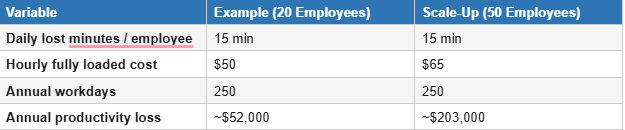
Those figures do not include the cost of a full network outage caused by hardware failure. A complete network-down event — even for a few hours — can disrupt operations, delay customer deliverables, and trigger a scramble for emergency IT support at premium rates.
A modern, stable network eliminates the majority of these events before they occur. That is not just better infrastructure — it is business insurance.
Every environment is different, but a properly scoped network upgrade from a managed IT services provider like Ferrara IT typically includes:
For organizations planning a parallel move to cloud services, the network upgrade project is also an opportunity to assess cloud migration readiness — ensuring your infrastructure supports the bandwidth and latency requirements of cloud-hosted applications.
Your business network likely needs an upgrade if: equipment is 3–5+ years old, users experience daily slowness or dropped connections, IT support tickets for network issues are frequent, your hardware has reached vendor end-of-support, or your organization is adding users and devices faster than your infrastructure can scale.
Use this checklist to evaluate your current environment:
If three or more of these apply to your business, a professional network assessment is the appropriate next step — not more repair tickets.
When businesses contact us about network performance issues, we start with listening — understanding the specific symptoms, frequency, and business impact before recommending any solution.
Our process follows a structured methodology:
A network upgrade is not the right solution for every situation. If our assessment determines that a targeted repair or configuration change will fully resolve the issue, that is what we will recommend. Our goal is to provide the most cost-effective solution for your business — not to sell hardware.
Most IT professionals recommend a network hardware refresh every 3–5 years. By year five, equipment is often approaching vendor end-of-support, lacks current security firmware, and no longer meets the bandwidth demands of a modern workforce.
No. A network upgrade replaces or enhances components of an existing network, while a network installation builds a new network from scratch. Upgrades are typically less disruptive and less expensive than full installations.
Yes. A qualified managed IT services provider (MSP) like Ferrara IT can assess, design, implement, and monitor a network upgrade as part of a broader managed services engagement or as a standalone IT project.
ROI on a network upgrade comes from three sources: reduced repair and labor costs, lower ongoing IT support expenses, and recovered employee productivity. For many small businesses, the payback period is under 12 months.
→ Managed IT Services — 24/7 Support & Proactive Monitoring
→ Network Upgrade Service — Project Planning & Implementation
→ IT Assessments — Evaluate Your Current Environment
→ Cloud Migration & Optimization Services
→ Managed Security — Advanced Cybersecurity Protection
→ Blog: How to Choose the Right Managed IT Services Provider


© 2026 All Right Reserved | Ferrara IT